In full, this post is going to cover a number of topics including but not limited to network device discovery with nmap, capturing and analyzing network traffic with wireshark, querying the roku developer api with curl to obtain information or device control, security related issues including denial of services both offensively and passively, as well as implementing python3 in the form of a command-line script which will later be used in conjunction with a custom crossplatform front-end to control these Roku devices from your phone, tablet, or computer. Source code will be posted publicly here as well as on my GitHub.
I’m approaching this text in an exploratory manner; I have some foresight and feel I can accurately predict some of what is to come. With that said, I am writing as I go, and will be programming once the post is more or less finished.

IP
MAC octets 1-3
MAC octets 4-6

10.0.0.59
AC:AE:19
07:1D:3E

10.0.0.227
AC:AE:19
07:22:57
IP
MAC octets 1-3
MAC octets 4-6
10.0.0.59
AC:AE:19
07:1D:3E
10.0.0.227
AC:AE:19
07:22:57
In this case, the most important piece of information is the IP address. It’s worth mentioning the similarity in the first three octets of the MAC addresses returned from the network scan. These octets represent the OUI, or Organizationally Unique Identifier which simply put is a unique identifier assigned to Roku devices and as such we could filter our search specifically with this identifier as well.
It would appear at this time there are two Roku devices on my LAN located at addressess 10.0.0.59 and 10.0.0.227. I’ll use nmap to do a more thorough scan to see what ports are open and services it may be using. I’ll be focusing on the former address now:
sudo nmap -p- 10.0.0.59

Starting Nmap 7.94 ( https://nmap.org ) at 2023-09-25 12:35 EDT
Nmap scan report for 10.0.0.59
Host is up (0.0087s latency).
Not shown: 65532 closed tcp ports (reset)
PORT      STATE SERVICE
7000/tcp  open  afs3-fileserver
8060/tcp  open  aero
41734/tcp open  unknown
MAC Address: AC:AE:19:07:1D:3E (Roku)
and a more specific search targeted at the returned ports:
sudo nmap 10.0.0.59 -p7000,8060,41734 -sV -A -v

PORT      STATE SERVICE VERSION
7000/tcp  open  rtsp    AirTunes rtspd 377.40.00
|_rtsp-methods: ERROR: Script execution failed (use -d to debug)
|_irc-info: Unable to open connection
8060/tcp  open  upnp
| fingerprint-strings:
|   FourOhFourRequest:
|     HTTP/1.1 404 Not Found
|     Server: Roku/12.0.0 UPnP/1.0 Roku/12.0.0
|     Content-Length: 0
|   GetRequest:
|     HTTP/1.1 200 OK
|     Server: Roku/12.0.0 UPnP/1.0 Roku/12.0.0
|     Content-Length: 1133
|     Cache-Control: no-cache
|     Content-Type: text/xml; charset="utf-8"
|     <?xml version="1.0"?>
|     <root xmlns="urn:schemas-upnp-org:device-1-0">
|     <specVersion>
|     <major>1</major>
|     <minor>0</minor>
|     </specVersion>
|     <device>
|     <deviceType>urn:roku-com:device:player:1-0</deviceType>
|     <friendlyName>Cottage</friendlyName>
|     <manufacturer>Roku</manufacturer>
|     <manufacturerURL>http://www.roku.com/</manufacturerURL>
|     <modelDescription>Roku Streaming Player Network Media</modelDescription>
|     <modelName>3900X</modelName>
|     <modelNumber>3900X</modelNumber>
|     <modelURL>http://www.roku.com/</modelURL>
|     <serialNumber>YG0002400133</serialNumber>
|     <UDN>uuid:295c0000-0806-101b-8005-acae19071d3e</UDN>
|     <serviceList>
|     <service>
|     <serviceType>urn:roku-com:service:ecp:1</serviceType>
|     <serviceId>urn:roku-com:serviceId:ecp1-0</serviceId>
|   HTTPOptions:
|     HTTP/1.1 200 OK
|     Server: Roku/12.0.0 UPnP/1.0 Roku/12.0.0
|_    Content-Length: 0
41734/tcp open  unknown
| fingerprint-strings:
|   FourOhFourRequest, GetRequest, HTTPOptions:
|     HTTP/1.0 404 Not Found
|     Content-Length: 0
|_    Content-Type: text/plain
2 services unrecognized despite returning data. If you know the service/version, please submit the following fingerprints at https://nmap.org/cgi-bin/submit.cgi?new-service :
==============NEXT SERVICE FINGERPRINT (SUBMIT INDIVIDUALLY)==============
SF-Port8060-TCP:V=7.94%I=7%D=9/25%Time=6511B8FF%P=x86_64-pc-linux-gnu%r(Ge
SF:tRequest,502,"HTTP/1\.1\x20200\x20OK\r\nServer:\x20Roku/12\.0\.0\x20UPn
SF:P/1\.0\x20Roku/12\.0\.0\r\nContent-Length:\x201133\r\nCache-Control:\x2
SF:0no-cache\r\nContent-Type:\x20text/xml;\x20charset=\"utf-8\"\r\n\r\n<\?
SF:xml\x20version=\"1\.0\"\?>\r\n<root\x20xmlns=\"urn:schemas-upnp-org:dev
SF:ice-1-0\">\r\n<specVersion>\r\n<major>1</major>\r\n<minor>0</minor>\r\n
SF:</specVersion>\r\n<device>\r\n<deviceType>urn:roku-com:device:player:1-
SF:0</deviceType>\r\n<friendlyName>Cottage</friendlyName>\r\n<manufacturer
SF:>Roku</manufacturer>\r\n<manufacturerURL>http://www\.roku\.com/</manufa
SF:cturerURL>\r\n<modelDescription>Roku\x20Streaming\x20Player\x20Network\
SF:x20Media</modelDescription>\r\n<modelName>3900X</modelName>\r\n<modelNu
SF:mber>3900X</modelNumber>\r\n<modelURL>http://www\.roku\.com/</modelURL>
SF:\r\n<serialNumber>YG0002400133</serialNumber>\r\n<UDN>uuid:295c0000-080
SF:6-101b-8005-acae19071d3e</UDN>\r\n<serviceList>\r\n<service>\r\n<servic
SF:eType>urn:roku-com:service:ecp:1</serviceType>\r\n<serviceId>urn:roku-c
SF:om:serviceId:ecp1-0</serviceId>\r\n<co")%r(HTTPOptions,50,"HTTP/1\.1\x2
SF:0200\x20OK\r\nServer:\x20Roku/12\.0\.0\x20UPnP/1\.0\x20Roku/12\.0\.0\r\
SF:nContent-Length:\x200\r\n\r\n")%r(FourOhFourRequest,57,"HTTP/1\.1\x2040
SF:4\x20Not\x20Found\r\nServer:\x20Roku/12\.0\.0\x20UPnP/1\.0\x20Roku/12\.
SF:0\.0\r\nContent-Length:\x200\r\n\r\n");
==============NEXT SERVICE FINGERPRINT (SUBMIT INDIVIDUALLY)==============
SF-Port41734-TCP:V=7.94%I=7%D=9/25%Time=6511B901%P=x86_64-pc-linux-gnu%r(G
SF:etRequest,47,"HTTP/1\.0\x20404\x20Not\x20Found\r\nContent-Length:\x200\
SF:r\nContent-Type:\x20text/plain\r\n\r\n")%r(HTTPOptions,47,"HTTP/1\.0\x2
SF:0404\x20Not\x20Found\r\nContent-Length:\x200\r\nContent-Type:\x20text/p
SF:lain\r\n\r\n")%r(FourOhFourRequest,47,"HTTP/1\.0\x20404\x20Not\x20Found
SF:\r\nContent-Length:\x200\r\nContent-Type:\x20text/plain\r\n\r\n");
MAC Address: AC:AE:19:07:1D:3E (Roku)
Warning: OSScan results may be unreliable because we could not find at least 1 open and 1 closed port
Device type: phone
Running: Google Android 5.X
OS CPE: cpe:/o:google:android:5.1.1
OS details: Android 5.1.1
Uptime guess: 7.622 days (since Sun Sep 17 21:49:26 2023)
A lot of information can be extrapolated from this output, however it is important to note the bulk of useful information is returned from probes at port 8060 - most importantly an HTTP server is running here and it is accepting HTTP requests. The service type returns urn:roku-com:service:ecp:1.
By default nmap is going to focus on TCP ports and services, and blindly scanning UDP is far less reliable. While there are techniques to improve scan speeds, it’s much easier to capture some traffic over the LAN using wireshark or similar network traffic tool.
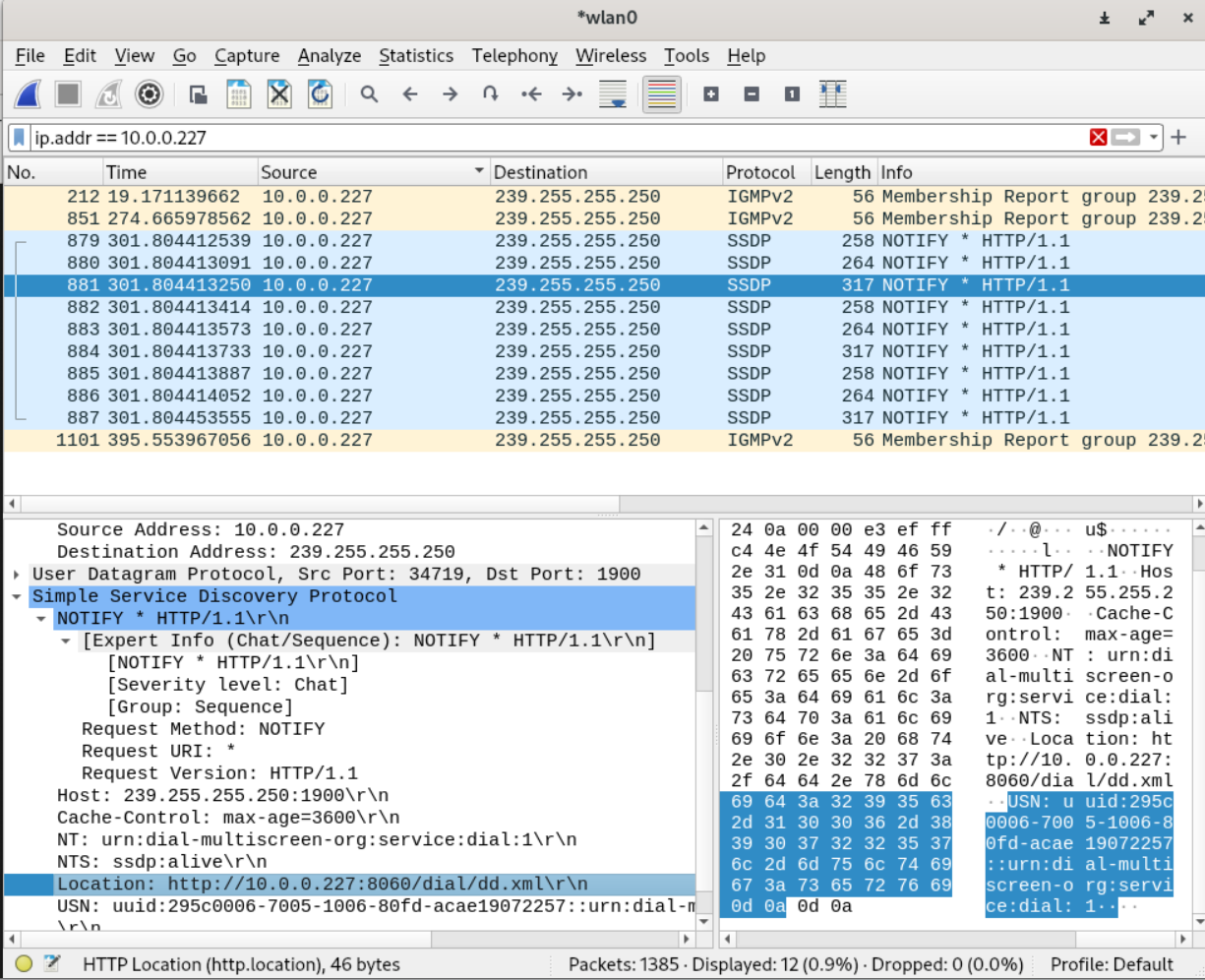
II. Capturing Roku UDP network traffic.
You’ve probably noticed I’ve set my capture filter to ip.addr == 10.0.0.227, which is the second Roku device I found on the LAN. I currently am recovering from knee surgery, and watching netflix on the 10.0.0.59 device, which due to being in use is not sending SSDP packets.
To confirm what I consider is a fair assumption, I run one last nmap scan - a UPnP script scan on UDP port 1900 directed at the Roku device I am analyzing:
sudo nmap --script 'upnp-info' 10.0.0.59 -sU -p 1900 -v

PORT     STATE SERVICE
1900/udp open  upnp
| upnp-info:
| 10.0.0.59
|     Server: Roku/12.0.0 UPnP/1.0 Roku/12.0.0
|_    Location: http://10.0.0.59:8060/
MAC Address: AC:AE:19:07:1D:3E (Roku)
Not much new to add there however it is clear that a service is also running on UDP port 1900. Moving forward, the focus will be on:
http server at TCP port 8060
UDP port 1900
urn:roku-com:service:ecp:1
External Control Protocol (ECP)
The first webpage that pops up after searching google for the string “urn:roku-com:service:ecp:1” is developer documentation from the https://developer.roku.com subdomain. Awesome!
I learn that ecp stands for external control protocol. It’s clear from the name of this protocol what it is intented to be used for:
“The External Control Protocol (ECP) enables a Roku device to be controlled over a local area network by providing a number of external control services. The Roku devices offering these external control services are discoverable using SSDP (Simple Service Discovery Protocol). ECP is a simple RESTful API that can be accessed by programs in virtually any programming environment.”2
Music to my ears. Having never researched into Roku devices much, I was unaware there was a public API one could utilize. One that appears to be fully documented. This takes a lot of trial, error and guesswork out of playing around with the device over the network.
After quickly looking over the documentation, I noticed there is no authentication/api key implementation; so my initial fear is this could easily be abused. Especially given Roku is such a big name when it comes to these types of devices. More on this later.
I like to get my hands dirty, so following the documentation I pull some device details by querying the API from a bash shell using curl.
That’s a good chunk of information describing varios device features supported/enabled, firmware versions, external devices connected, hardcoded serial numbers, model numbers, network information etc.
Another query which will return information about what the device itself is doing:
curl "http://10.0.0.59:8060/query/media-player"

<?xml version="1.0" encoding="UTF-8" ?>
<player error="false" state="play">
	<plugin bandwidth="5000000 bps" id="12" name="Netflix"/>
	<format audio="aac_adts" captions="none" drm="none" video="mpeg4_10b"/>
	<position>2531111 ms</position>
</player>
Keypresses can be sent via curl; Sending blank POST requests to the url http://10.0.0.59:8060/keypress/[key] where [key] is any of the following: