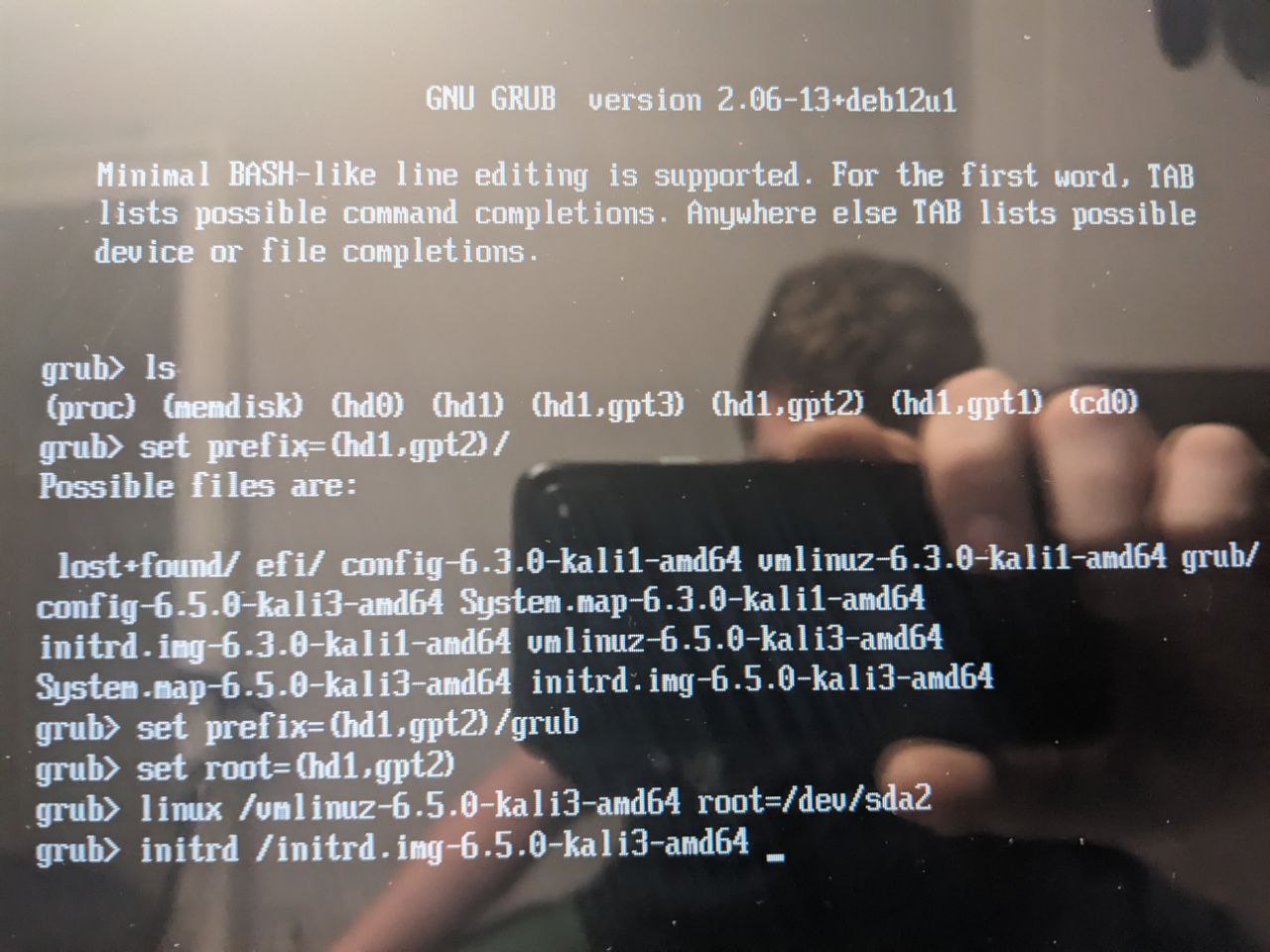
I’d like to preface this article with an appology. I try to always use images I’ve taken, and unfortunately these had to be taken from a phone. And the iMacs I run linux on are really reflective.
There is some history leading up to my writing of this, but feel free to skip it if you want to get right into it. Back in the 90s when I was attempting to self teach myselfhow to become really good with linux as I saw it as a necessary skill to have to become1337, I found myself in a rather frustrating position. Quite literally, I could not seem to install the damn thing. Now at the time, I was attempting to install Redhat, and I gotta say - the installation process as a whole has really come a long ways since that time! Nevertheless, people typically didn’t have multiple computer systems at home like they do now, and I was faced with the challenge of dual booting it alongside Windows 95.
I messed up, or at least thought I messed up our family computer at least 5 times. Probably more. I was fortunate to have a relatively patient dad - I mean, I can’t remember catching much trouble in repeatedly messing our computer up to load an OS that quite honestly had the installation gone successfully, I’d have haf no clue how to manage. Each failure resulted in a broken system with no way to boit the Windows system or Redhat one - meaning a full wipe/fresh install of Windows each time. After getting older and gaining more experience, I can see the grub promptfor what it is- a tool that allows you to tell the system where important files or partitions are, so it can continue and do the actual hard work of booting it properly.
What was happening back all those years? You can read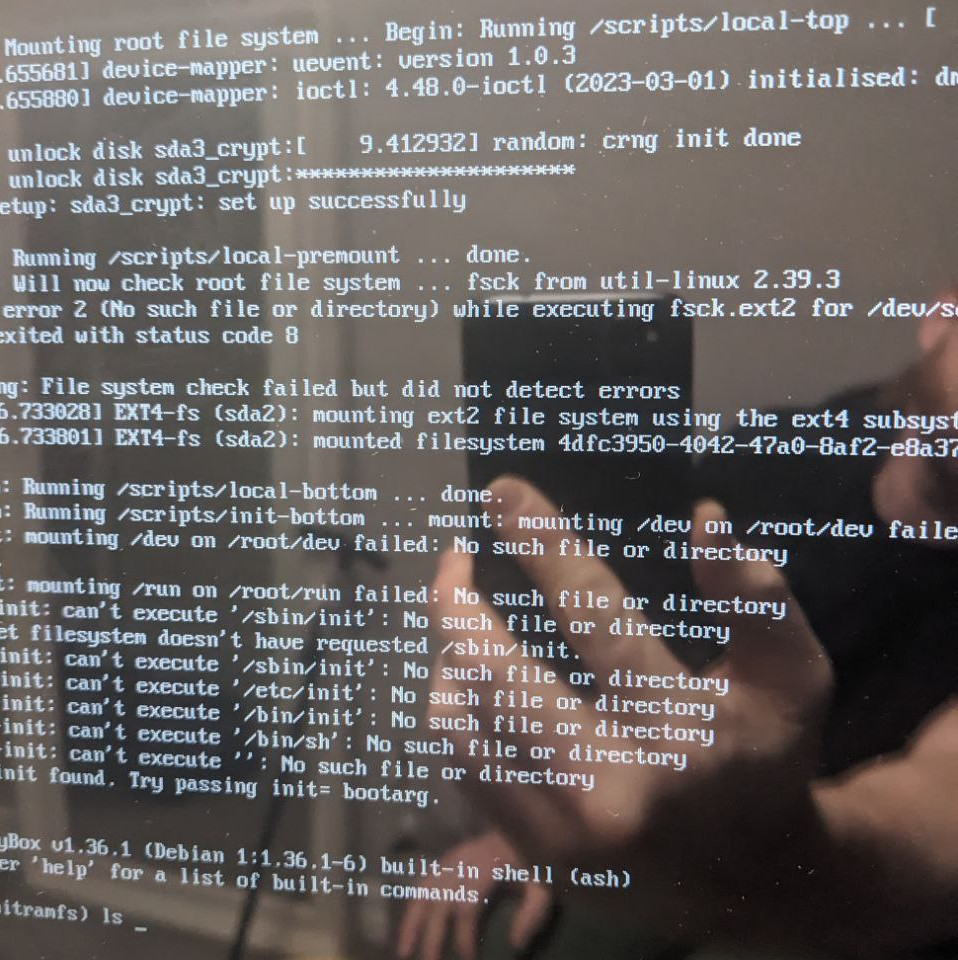
When something does goes wrong, don’t let all the output overwhelm you - it’s there to help. In the image above, it’s quite clear I passed the wrong parameter when loading initrd.img into memory. This is shown on the lower second half where there are failuresmounting /runand the resulting failure when attempting to execute scripts in*/etc, /bin, /sbin, ..*. The fact I’m at theintramfs shellmeans the kernel image and initrd images have loaded into ram succesfully, and the focus should be shifted to the parameter pointing to the root filesystem. If this doesnt make sense now, it will once you finish this read.
LEARNING BY EXAMPLE
No doubt this is a lot to swallow. If you’re still with me you may be feeling overwhelmed. There’s no better way to learn than getting your hands dirty!grub>ls
(proc) (memdisk) (hd0) (hd1) (hd1,gpt3) (hd1,gpt2) (hd1,gpt1) (cd0)
grub>ls(hd1,gpt2)/
lost+found/ efi/ vmlinuz vmlinuz-6.3.0-amd64 vmlinuz-6.5.0-amd64 grub/ initrd.img initrd.img-6.3.0-amd64 initrd.img-6.5.0-amd64
PROTIP 1:Both the grub shell and intramfs shell havetab completionand a set of familiar linux commands to work with.Press TAB at the shell promptand recieve a list of commands you can use.
PROTIP 2:You can get a list ofenvironment variablesby typing in a**$**and hitting TAB a few times! You can display the contents of any variable you want to by echoing it out, prefixing the variable name with $ as you would in any shell script: echo “$VARNAME”
The linux commabdlsis used to list files and folders. In this case it will also list disks and partitions in the form of*(hdX,gptX).hd0translates as ‘hard drive 0’.hd1,gpt3translates as ‘hard drive 1, gpt partition #3’.If the partition table is of type MBR, you’ll see the partitions laid out with ‘msdos’ preceeding the partition number. Accessing the files stored on each partition can be done as you would any file or folder, and you can navigate using thecd*command.
The goal here is to find the partition/folder locations of the grub.cfg file, the kernel image vmlinuz, and the intramfs image initrd.img.
It’s important to note that there are multiple kernel and initrd images here, and this is not always the case. It’s probably good practice to maintain one version, ie: Use vmlinuz-6.5.0 with initrd-6.5.0. And unless an updated kernel is the issue at hand, using the highest version kernel available.
**PROTIP 3:**If you have any USB drives or external disks you don’t need plugged in, unplug them now. They can make things a bit confusing as they add additional drives and partitions which aren’t labelled more than by type and number.
If we review the boot process, GRUB is looking to do two things - load the compressed kernel image into memory, and set the initial ramdisk up thereby allowing it to load system modules before mounting the root filesystem. We pass the compressed kernel image with thelinuxcommand, but not before setting a couple variables:grub>ls(hd1,gpt1)/
lost+found/ efi/ vmlinuz vmlinuz-6.3.0-amd64 vmlinuz-6.5.0-amd64 grub/ initrd.img initrd.img-6.3.0-amd64 initrd.img-6.5.0-amd64
grub>ls(hd1,gpt1)/grub/
grub.cfg# <- The Grub Configuration File
grub>setprefix=(hd1,gpt2)/grub/# Notice trailing forward slash
grub>setroot=(hd1,gpt2)# Notice no trailing forward slash
Above we are setting two variables,prefix and root. As mentioned inPROTIP 2, you can get a list of variables by typing $ and hitting tab a few times. For instance, if you are getting too much screen output, you canset pager=on.
PREFIX, as its name indicates, is the location the grub.cfg file is found. Think of it this way - when grub goes to load the configuration file, it is going to try to load it relatively at the PREFIX location, so ${PREFIX}grub.cfg. That’s not a typo. I smashed my head over this for a while - if you don’t leave a trailing forward slash, it’s going to be looking in**(hd1,gpt2)/grubgrub.conf instead of (hd1,gpt2)/grub/grub.conf**
ROOTon the other hand points to where**/in thecurrent grub shellpoints to. You essentially save yourself the trouble of typing in the full disk and partition location by doing this, and is helpful if you are feeling out the drives as one will likely need to do. Any call made on the system end to a location will include the / and expect it to be the root directory from which everything else can be found. By setting the variable without the trailing forwardslash, you can move forward using the shell as you would normally, with the root of the partition we will be loading images from being located at/**.
A note on the trailing slashes - these are pretty big deals in tbe name of repeatability. Low level shells like this are muvh less forgiving, so it is good practice to follow. I only came to this understanding from a lot of trial and error - my hope is it saves someone else the time and energy.
LETS DO SOME WORK
Set variables PREFIX and ROOT
grub>setprefix=(hd1,gpt2)/grub/# To location where grub.cfg is located
grub>setroot=d(hd1,gpt2)# To the partition containing vmlinuz and initrd.img
Load the images into ram
grub> linux /vmlinuz-6.5.0-amd64 root=/dev/sdb2# Decompress kernel into RAM
grub> initrd /initrd.img-6.5.0-amd64# Mount init ramdisk
grub> boot# Boot the system
To my understanding, this is about the minimum lines it will take to boot the system providing nothing is actually corrupt and the necessary files exist. You will notice what may seem like a redundent parameter when calling the kernel on the third line. The parameterroot=/dev/sdb2is passed which indicates the root filesystem. As redundent as it may seem, you’ll get a kernel panic if this is left out. It might have to do with how the system is interpreting the drives and partitions at this point in the process but that’s just a guess on my end.
**PROTIP 4:**The /dev/sdX or /dev/hdX convention is standard to linux systems. Just keep in mind that this is referring to the same places grub interprets as (hdX,gptX). Remember this though:ex 1. (hd0,gpt1) is the same as /dev/sda1
ex 2. (hd3,msdos2) is the same as /dev/sdd2
ex 3. (hd1,gpt2) is the same as /dev/sdb2
The drive number and partition number are directly related to the the /dev/sdX# letter and number (where X corresponds to the drive and # the partition). Since the drive starts counting up from 0, as in hd0, hd1, hd2, etc.. the first drive hd0 can be referred to in the root parameter as /dev/sda.
In the example I’ve been using, the root partition is found on at (hd1,gpt2) which means the root parameter I am passing is**/dev/sdb2**. And lastly, to hopefully clear any confusion up,sdXis referring to the drive connected to the firstSATA controller, and would be seen as /dev/hdX if it were connected to anIDE controller
INTRAMFS SHELL
REMAINDER MAY BE LOST. Will update if found.