Like most people, you’ve probably experienced using a shared internet connection without (legal) access to its administration panel. Think back to student housing—college dorms, apartments, or homes rented by the room, all with shared WiFi and common areas. While restrictive network setups help protect users, they severely limit your options, particularly if you want to host services like a personal website that should be reachable outside your local network.
In situations involving restrictive firewalls or NAT setups on IPv4, external traffic (the WAN) sees only the gateway’s IP—not the individual devices within the network. Without admin access to configure incoming data routes, it becomes a major hurdle: how can external users find your device if everything is hidden behind a single public IP?
To verify this, you can check your external IP with a service like whatismyip.com from multiple devices, or run this command:
curl -L https://www.wtfismyip.com/text | tee IP.ADDR
This displays your external address in the terminal while also writing it to a file named IP.ADDR. Unless you’re using a VPN or proxy, each device will show the same external IPv4. A traceroute will typically reveal it’s a single hop away, indicating the gateway belongs to your ISP.
When it comes to outgoing data, this really poses no issue from a functional standpoint. In fact as briefly mentioned earlier, there is a layer of security in a setup like this, and it’s typically good practice not to leave anything open to the WAN that doesn’t have to be. So with this said, it’s not abnormal for restrictive default configurations to be found in routing equipment. If you don’t have access to the administration panel to configure ports to do things liketrigger, open, and forward, you may find yourself at a standstill serving anything yourself to anyone beyond your LAN.
Reverse tunneling SSHis a solution to the aforementioned problem above. This is admittedly a vague scenario outlined above, so here are a couple ofreal worldexamples:
1 - To create a public access point
shadow[dot]techrents virtual computer systems which accessible using their proprietary software which acts similar in function toRemote Desktop Protocol. Transferring files from your computer to the shadow computer can be done using their software, dragging and dropping a file from your computer onto the shadow computer desktop, however this presents as slow and will often error out or drop before the file is finished transferring with no method of continuing a dropped download that has failed. The Shadow system does not have an public IP address, so enabling the SSH server and attempting to connect and transfer files via SCP or similar fails.
A reverse SSH tunnel resolves the missing public IP address issueand even increases the speed at which data can transfer between you and the shadow pc. This opens up a multitude of methods to transfer the files,many of which may include resuming a transfer if a connection is dropped- a massive benefit when transferring large files.
2 - To forward a service to the public
You’ve been playing around with ComfyUI, the Stable Diffusion webUI and you want to share it with some close friends. Unfortunately, ComfyUI doesn’t come with the**–share**option which is built into ATOMIC1111111’s UI using the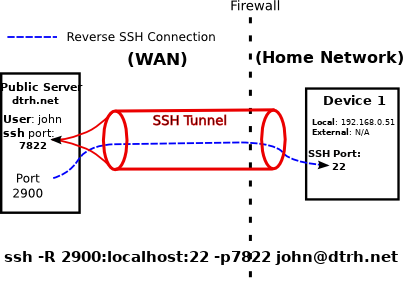 -p7822
At home, John has the SSH daemon running onport 22, which is the default port used for SSH. He wants to use dtrh.net to bounce his connection back home. To do this, a connection between his home computer and dtrh.net must be established ahead of time. He will forward any connections made onport 2900atdtrh.netback home toport 22where his SSH service is running:-R 2900:localhost:22
Reverse SSH Tunnel:A bidirectional tunnel from remote device to local device over SSHCommand:ssh -R [remote_src_port]:[local_host]:[local_dest_port] [remote_user]@[remote_host] -p [remote_daemon_port]-RReverse tunnel flag, remember this is case sensitiveremote_src_portThis is the port on the remote machine that will route data through the tunnel to your local device.local_hostThis is your local device running the service you want to make accessible beyond it’s LAN. You can typically use any local reference, includinglocalhost,127.0.0.1,192.168.x.x,10.0.0.x, etc.local_dest_portThis is the port on your local device you are running a service on that you wish to make public. This is the port you want incomming connections made topublic_fwd_portto be tunnelled to.remote_userThis is the user account on the publicly accessible remote machine which had shell and SSH access.remote_hostThis is the publicly accessible remote machine host name or IP address which will be forwarding connections to your port/serviceremote_daemon_portThis is the publicly accessible remote machines port running the SSH daemon. In other words, for any other normal SSH session, this is the port you would use
If it makes it easier,remoteandpublicare interchangeable here, and are referring to the system which does not have a restrictive firewall infront of it; it has a public IP address.
 , and after authenticating I am given a shell on rabbit-hole.ca.When this session terminates, so does every other connection running through it. Utilizing the SSH flags**-fN**, you can dump the terminal session to the foreground and disable input as a means of easily identifying the terminal running with the active tunnel.
Take a look at the screen on the right. I log into my seedbox, located in the states, and attempt to connect via SSH to my public IP as shown by my VPN. It’s no surprise this does not work.By connecting to my local user account (kbs) at the public server and forwarded port, I can now connect back home to resources such as ssh in this example.. I’m left with a shell, accessible by means of the tunnel from rabbit-hole.ca to home.
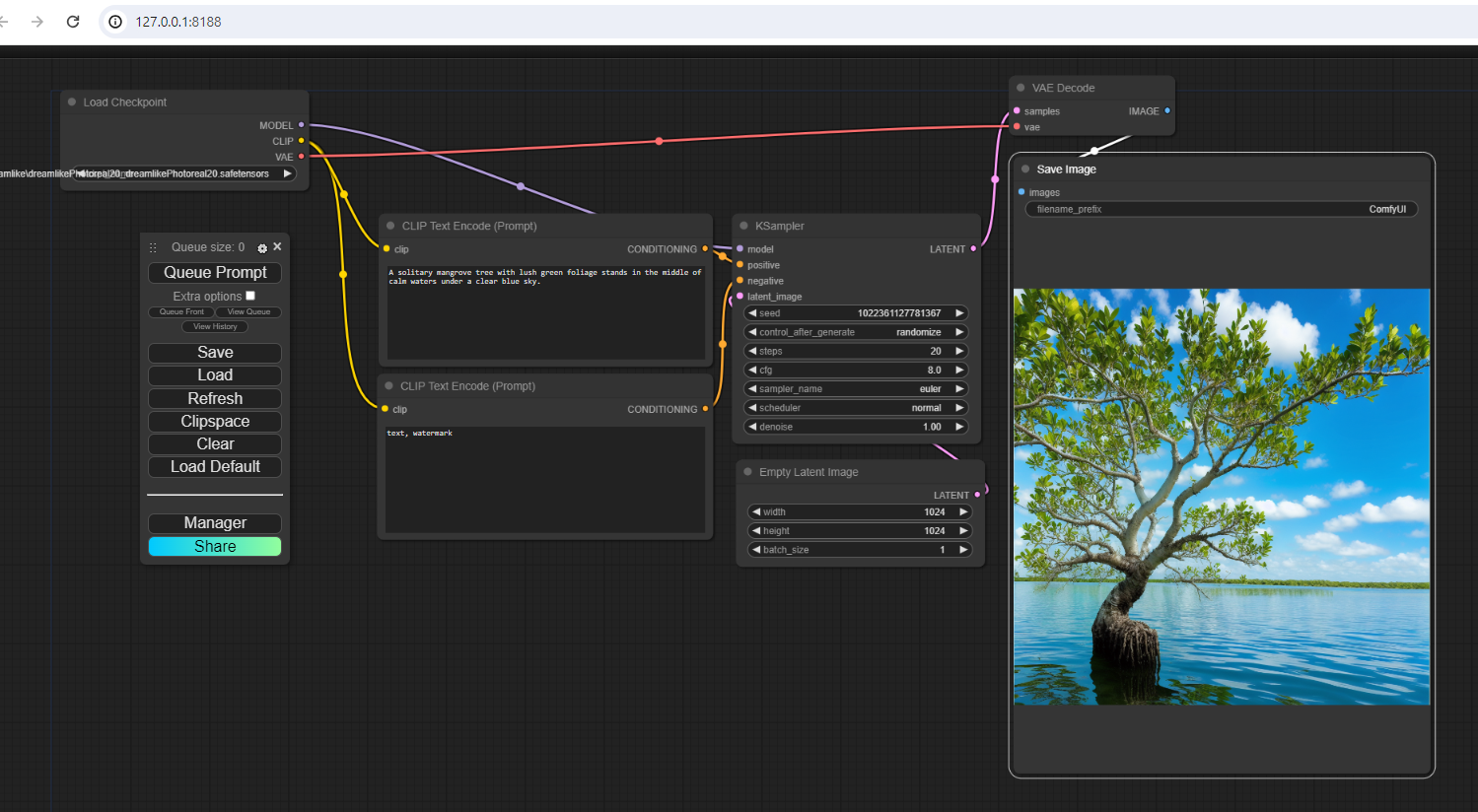
You can test out the true power ofStable Diffusion AI Image Generation using ComfyUI Workflows if my shadow PC is on
I am serving both of these via HTTP service through an SSH reverse tunnel on a system with no public IP via forwarding with my VPS.
A WORD OF CAUTION
The beginning of this text loosely outlines the idea that having a restrictive firewall/gateway is beneficial from a security standpoint. These tunnels allow you to do some cool stuff, but they can just as easily open holes up exposing potentially unwanted and sensitive data to the world. Take care in properly closing any tunnels you are no longer using. A good rule of thumb is if you can avoid opening public ports and get the results you are after, leave them closed. Anything open to the public should be considered a potential security risk.
THERES MORE?
This text is far from complete - there is much more to these topics than I’ve covered here, and they could be covered in much more detail. With that said, I feel as though this could act as an informative post for anyone getting their feet wet with these types of operations.